Why floating PC cases can improve GPU cooling and airflow | Daily Reports Online
Most PC cases keep the main chassis relatively close to the desk or floor, but a growing number of new designs are doing something much more fun, yet practical, with the space underneath.
Our favourites deliberately add a gap that gives the case a floating effect. Others take a simpler approach and raise the whole chassis on a stand or base. Either way, manufacturers are paying much more attention to the underside of your PC.
The new designs are definitely about style, particularly as panoramic glass cases have become more popular, but there’s a practical side to floating cases too.
Opening up the lower part of a build gives manufacturers new ways to get cool air towards one of its hottest components: the graphics card. Some designs can also keep the PSU’s airflow separate from the main component chamber.
Of course, not everyone wants to DIY a new build, so for anyone who would rather buy a complete system, it’s worth checking out our guide to the best gaming PCs.
Why are PC cases starting to float?
Panoramic cases, often called fish-tank cases, have become increasingly popular, often replacing conventional mesh panels with extensive glass. While glass makes it easy to see your new CPU cooler’s built-in display, it does mean manufacturers need to take a fresh approach with airflow.
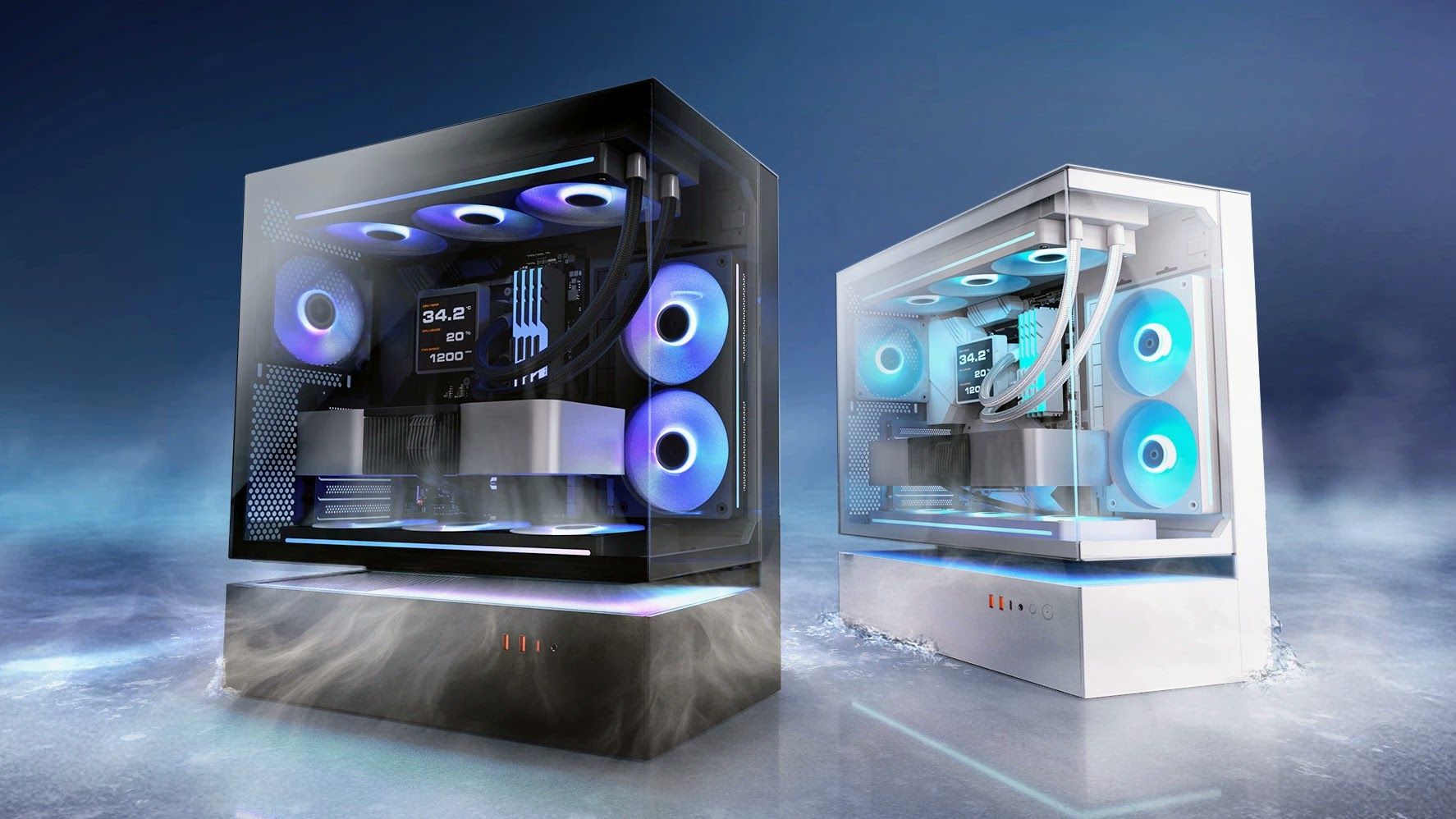
One of the most distinctive new designs is the floating style, where the lower part of the case is deliberately separated or recessed so the main body looks like it’s suspended above the base.
The Cougar CFV235 is one of our favourite examples. Cougar separates the PSU cabin from the main component chamber, leaving an open section between them that becomes part of both the case’s appearance and its ventilation. Our colleagues over at Tom’s Hardware highlighted the design’s 270-degree airflow when the CFV235 was unveiled, with air able to enter the floating section from several directions.
The DarkFlash Floatron F1 creates a similar visual effect in a different way, suspending the main chassis above an extended base that draws air in through the bottom and sides. The look certainly caught the attention of our friends over at PC Gamer at Computex 2026, where it was described as “sort of ugly but also sort of neat”.
(Image credit: DarkFlash)


More are coming too. MSI showed its MPG VIXTA 300R Airflow PZ at Computex 2026 with a 75mm (3in) recessed section beneath the main chassis. PC Gamer highlighted its “innovative floating base design”, which gives the case substantially more clearance underneath for incoming air.
Hyte also showed the upcoming Y50 RGB, which it describes as having a floating base and stepped internal floor. Tom’s Hardware noted its relatively affordable price, showing that this style is beginning to reach cheaper cases too.
The floating look can also help airflow
The empty or recessed space underneath isn’t only decorative, and it’s a key way to bring air into the lower part of the PC.
Exactly how that is achieved varies from case to case. The Cougar CFV235 turns the open section between its two chambers into a large ventilation area. DarkFlash feeds air through the bottom and sides of its raised base, while MSI uses the space beneath the VIXTA as part of its lower intake design.
So while the implementations differ, the space underneath is deliberately designed as part of the intake path.
This setup can be particularly useful for graphics card cooling. A GPU normally sits towards the bottom of a case, so cooler air entering below it can take a relatively direct path to the graphics card.

(Image credit: Future)


Floating-style options
These are the options to consider if the floating look is the priority, with both using the space beneath the main chassis as part of the design.
A raised base can achieve something similar
You don’t need the full floating style to get some of the same airflow advantages. Many manufacturers take a simpler approach and raise the entire chassis using a stand or customised legs.
The Phanteks Evolv X2 offers wrap-around glass, but raises the base to help feed a bottom-to-top airflow layout.
The Tryx Luca L70 uses a 40mm (1.6in) X-shaped base to increase the clearance beneath the chassis. Tryx also showed a smaller Luca L50 at Computex 2026 with a bottom fan bracket that can sit flat or be angled towards the components.
These cases can still look partially suspended, but structurally the whole chassis is raised on a purpose-built base.
That extra clearance can be especially useful if the PC sits on the floor, because it keeps bottom intakes further away from carpet that might otherwise obstruct airflow.
Raised-base options
These cases lift the whole chassis to create extra clearance for bottom-mounted fans and intakes.
Does a lower intake actually improve cooling?
The graphics card is often a major source of heat in a gaming PC, particularly at the high end, and Nvidia’s GeForce RTX 5090, for example, has a total graphics power rating of 575W. If you’re building around one of the models in our guide to the best graphics cards, cooling it effectively becomes particularly important.
If you’re adding or replacing case fans, PC Gamer’s guide to the best PC fans is also a great resource.
Testing by PC Gamer and Tom’s Hardware suggests lower intake can make a difference, although the result depends on the rest of the case design.
PC Gamer gave the Corsair Frame 4500X 80% in its review and found that adding three bottom fans lowered its GPU temperature by 4°C.
Tom’s Hardware’s review of the Montech HS02 Pro similarly praised its focus on GPU cooling. The case, which is designed around three bottom intake fans, delivered the best GPU temperatures of the four cases in testing at the same noise level, while also allowing the graphics card’s own fans to run slower than in any of the competing cases.
There’s an important catch, though. Montech’s GPU-focused layout was less effective at cooling an air-cooled CPU. Your CPU cooler matters too, and Tom’s Hardware has a regularly updated guide to the best CPU coolers. Fan speed, dust filters, radiators and other internal obstructions can also change the result.
The tests support the broader idea rather than any one case style: getting cool air into the lower part of the chassis and directing it towards the graphics card can improve GPU cooling. A floating-style or raised-base design can make that easier, but neither guarantees lower temperatures on its own.
Bottom airflow doesn’t require a floating case
Other manufacturers are tackling the same airflow challenge without raising the case at all, using several different layouts to free up or make better use of the space below the GPU.
In a conventional layout, the PSU usually sits along the bottom of the chassis, often beneath a shroud. That occupies space that could otherwise be used for a larger floor intake or fans closer to the GPU. Moving the PSU into a separate chamber, towards the front or to the top gives manufacturers more freedom to use that lower area for cooling.
One approach is to put the PSU in a separate side or rear chamber. The Antec Constellation C8 ARGB separates the CPU and GPU from the PSU and drives, while the Corsair Air 5400 uses a dedicated chamber for the PSU, cables and storage. Lian Li’s O11 cases use a similar multi-chamber approach.

(Image credit: Antec)


Another option is to move the PSU towards the front. The Antec Flux M does this so the bottom can be opened up for a large mesh intake and fans beneath the GPU. The Okinos Air Cross and DeepCool’s CL6600 take a similar approach, with the CL6600 also separating its 360mm radiator into an upper chamber.
A third approach is to put the PSU at the top. Fractal Design’s Torrent Compact combines a top-mounted PSU with expansive base intakes and support for up to three 120mm or two 140mm bottom fans. The newer Hyte X50 and X50 Air use a top-mounted PSU canopy to open the floor for what Hyte calls Cold-Floor Cooling, with support for up to three 120mm fans beneath the graphics card.
Other cases improve lower airflow without relocating the PSU. The Montech HS02 Pro builds its cooling around three intake fans in the floor, the Antec P30 Air puts two reverse-blade fans on top of the PSU shroud and feeds them through a lower-side intake, and the NZXT H5 Flow RGB 2024 supports two 120mm fans in the lower section to feed air towards the GPU. The Lian Li O11 Dynamic Mini V2 instead angles its bottom fan mounts upwards by 10 degrees.
Floating-style cases are the most visually obvious part of the trend, but the bigger shift is manufacturers redesigning the lower part of the chassis around graphics card airflow, whether that means relocating the PSU, separating cooling hardware or simply finding better ways to direct cool air towards the GPU.
Other bottom-airflow options
These are our picks if improving lower GPU airflow matters more than getting the full floating look.