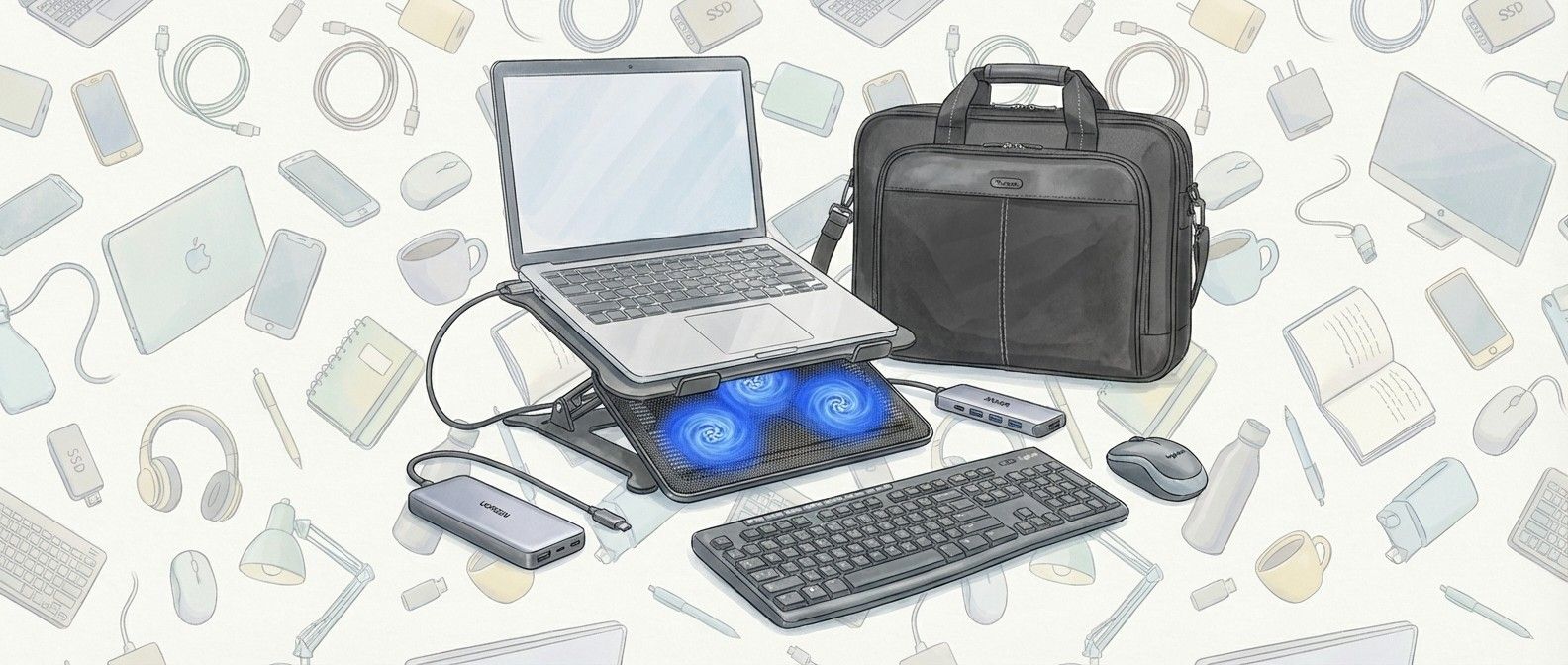
Have you been lucky enough to unwrap a new laptop this Christmas? If you have – or if you’re thinking about what to buy for your existing laptop – then this guide is for you. I’ve put together a list of must-have accessories that can quickly expand your new laptop’s capabilities – and they can all be had for less than $70!
My first suggestion is the excellent Anker 5-in-1 USB-C hub. Many laptops, especially thin-and-light ones, don’t come with that many ports these days, so plugging in a hub can quickly and easily allow you to use various peripherals and devices. Anker is a trustworthy brand, and this hub comes with two USB-C, two standard USB-A and a HDMI port that can transfer 4K video, so you can easily hook up your laptop to a monitor, TV, or projector.
I also suggest buying a laptop stand, such as the Urmust adjustable laptop stand. These make working on your laptop a lot more comfortable by raising them from your desk. While there are cheaper stands that are fixed as a certain height and angle, I recommend getting an adjustable one that means you can set it up perfectly for your needs. Keeping your laptop raised above the surface also helps it keep cool. Make sure you buy a stand that supports the size of your laptop, however, though most companies make laptop stands that cover various popular laptop sizes.
My next pick is the Ugreen Nexode 25,000mAh laptop power bank. While laptop battery lives are getting ever longer, it’s still a great idea to have a power bank too, so you can top up your laptop’s battery when you’re not near a power outlet. The 25,000mAh capacity is enough for more than one full laptop charge (from empty), so if your laptop’s battery life is around a whole day, this will give you another day without needing to plug your laptop in; it could be a real life saver! Of course, you can also plug in other devices, such as smartphones, and charge them multiple times as well. There are a lot of unkown brands selling laptop power banks, but I recommend you go with a trusted brand such as Ugreen, as you want the power bank to be as dependable as possible.
Obviously, laptops come with a keyboard and trackpad built-in, but I personally find it far more comfortable to use a larger physical keyboard and mouse when using my laptop at a desk, which is why I recommend the Logitech Mk270 Wireless Keyboard and Mouse Combo. Logitech makes quality peripherals, and buying this combo can save you money over getting the two peripherals separately. It also means you only need to plug in one wireless receiver (included). This works best with a USB-C hub, as you can leave the wireless receiver plugged into the hub, making it quick and easy to turn your laptop into a desktop-like setup in a matter of seconds.
While a keyboard and mouse combo is great for when you want to work at a desk, one of the best things about laptops is how portable they are. If you’re planning to travel a lot with your new device, then buying a bag or case – such as the Targus Slim Laptop Bag – is a great investment. Not only will it protect your laptop while you carry it, it also comes with pockets to store peripherals, accessories and charging cables. I’ve suggested an affordable product from Targus, which has a fine reputation for making dependable and attractive laptop bags and general baggage.
Finally, if you’re going to be using your laptop for gaming, video editing or other intensive tasks, then it’s worth considering a laptop cooling pad, such as the Havit Hv-F2056.
Sign up for breaking news, reviews, opinion, top tech deals, and more.
Simply place your laptop on top of the pad, and its three built-in fans, which are powered via USB, will fire up, helping to keep your laptop cool while it’s working. This can help performance, as if the components inside a laptop get too hot, the laptop will temporarily limit (known as ‘throttling’) its perfomance so it doesn’t overheat.
With a laptop cooling fan, the laptop keeps cooler for longer, which means it will be able to work harder for longer without any drastic loss of performance. While this isn’t essential if you’re only using your laptop for browsing the web and writing up documents, it can make a big difference for intensive tasks, especially if you’re using a thin and light laptop where airflow is particularly limited.
Picked by
Picked by
Matt Hanson
I’ve been leading TechRadar’s laptop coverage for over 10 years, and have been writing about laptops and computers for almost two decades. I know that to get the most out of your new laptop, buying the right accessories is essential – but that doesn’t mean you need to spend a fortune. I’ve hand-picked these accessories based on their quality and affordability.
Share WhatsApp could soon protect users from certain messages received from unknown senders, according to details spotted by a feature tracker. The messaging platform is reportedly working on a feature that will allow users to block messages from unknown accounts, which could improve performance of their device, while also keeping their account safe. WhatsApp has…
Share After-Christmas TV sales are live, featuring record-low prices on this year’s best-selling 4K, QLED, and OLED TVs. You can find some of the lowest prices of the year as retailers try to clear out stock to make room for newer models next year. As TechRadar’s deals editor specializing in TVs, I’ve reviewed today’s sales…
Share Storm-1175 rapidly moves from access to ransomware deployment Exploits zero-days and n-days across multiple products Targets healthcare, finance, education, and professional services Chinese-speaking hacking collective Storm-1175 is moving fast, going from initial access to full system compromise and data exfiltration in weeks, and sometimes in less than 24 hours, experts have warned. A new…
Share Nothing Ear Open was launched in India on Tuesday as the first open-style wireless headset by Nothing, the UK startup led by OnePlus Co-Founder Carl Pei. It features Nothing’s trademark transparent design. The Nothing Ear Open is equipped with a 14.2mm dynamic driver and has an IP54 rating for dust and splash resistance. They…
Share Samsung just launched it’s Galaxy S25 series with all three models going on sale in India. The smartphones are priced from Rs. 80,999 and offer Qualcomm’s latest Snapdragon 8 Elite processors in all markets. This was a noticeable shift from the Galaxy S24 series, which went with Samsung’s own Exynos 2400 SoC last year…
Share In a surprising turn of events, scientists have uncovered evidence suggesting that an adult porbeagle shark, a formidable predator in its own right, might have been eaten by an even larger predator. This shocking revelation emerged after a porbeagle shark fitted with tracking devices went missing in 2020. The tracking device, which eventually surfaced,…