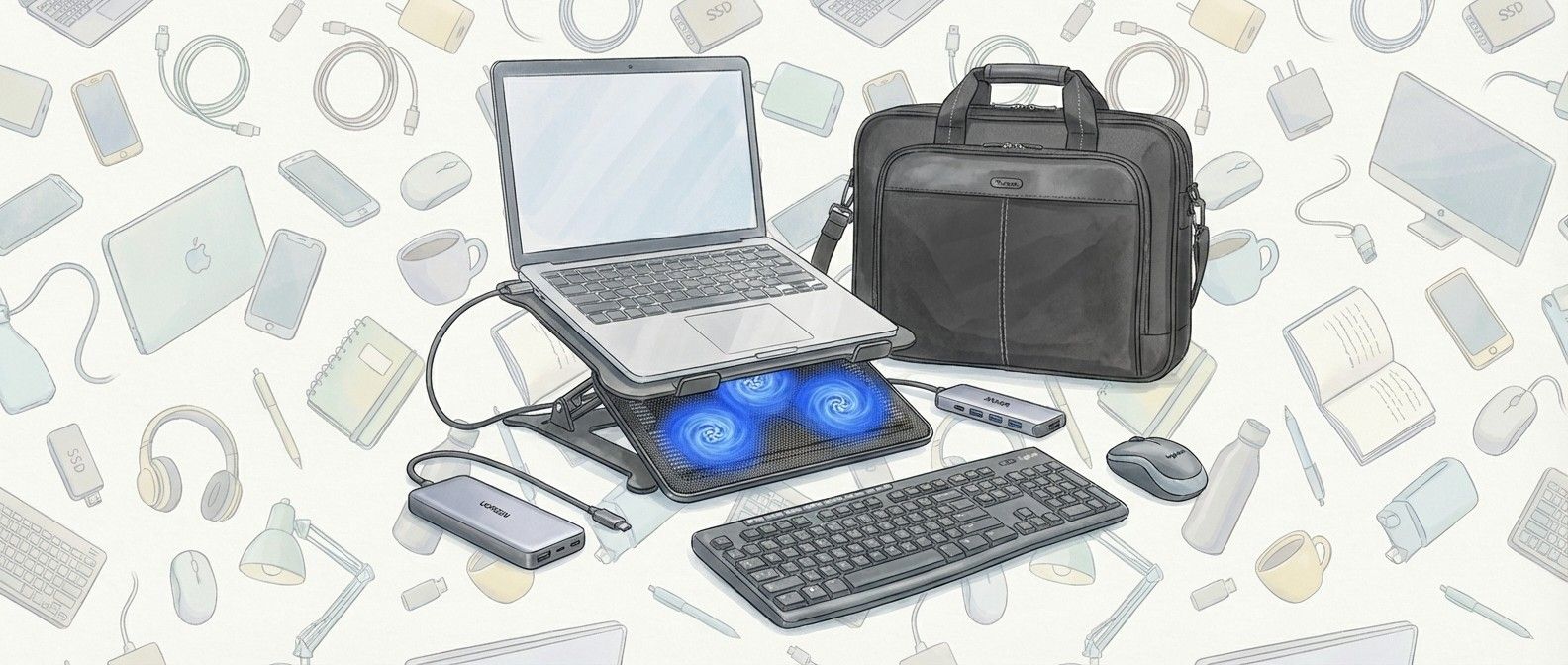
Have you been lucky enough to unwrap a new laptop this Christmas? If you have – or if you’re thinking about what to buy for your existing laptop – then this guide is for you. I’ve put together a list of must-have accessories that can quickly expand your new laptop’s capabilities – and they can all be had for less than $70!
My first suggestion is the excellent Anker 5-in-1 USB-C hub. Many laptops, especially thin-and-light ones, don’t come with that many ports these days, so plugging in a hub can quickly and easily allow you to use various peripherals and devices. Anker is a trustworthy brand, and this hub comes with two USB-C, two standard USB-A and a HDMI port that can transfer 4K video, so you can easily hook up your laptop to a monitor, TV, or projector.
I also suggest buying a laptop stand, such as the Urmust adjustable laptop stand. These make working on your laptop a lot more comfortable by raising them from your desk. While there are cheaper stands that are fixed as a certain height and angle, I recommend getting an adjustable one that means you can set it up perfectly for your needs. Keeping your laptop raised above the surface also helps it keep cool. Make sure you buy a stand that supports the size of your laptop, however, though most companies make laptop stands that cover various popular laptop sizes.
My next pick is the Ugreen Nexode 25,000mAh laptop power bank. While laptop battery lives are getting ever longer, it’s still a great idea to have a power bank too, so you can top up your laptop’s battery when you’re not near a power outlet. The 25,000mAh capacity is enough for more than one full laptop charge (from empty), so if your laptop’s battery life is around a whole day, this will give you another day without needing to plug your laptop in; it could be a real life saver! Of course, you can also plug in other devices, such as smartphones, and charge them multiple times as well. There are a lot of unkown brands selling laptop power banks, but I recommend you go with a trusted brand such as Ugreen, as you want the power bank to be as dependable as possible.
Obviously, laptops come with a keyboard and trackpad built-in, but I personally find it far more comfortable to use a larger physical keyboard and mouse when using my laptop at a desk, which is why I recommend the Logitech Mk270 Wireless Keyboard and Mouse Combo. Logitech makes quality peripherals, and buying this combo can save you money over getting the two peripherals separately. It also means you only need to plug in one wireless receiver (included). This works best with a USB-C hub, as you can leave the wireless receiver plugged into the hub, making it quick and easy to turn your laptop into a desktop-like setup in a matter of seconds.
While a keyboard and mouse combo is great for when you want to work at a desk, one of the best things about laptops is how portable they are. If you’re planning to travel a lot with your new device, then buying a bag or case – such as the Targus Slim Laptop Bag – is a great investment. Not only will it protect your laptop while you carry it, it also comes with pockets to store peripherals, accessories and charging cables. I’ve suggested an affordable product from Targus, which has a fine reputation for making dependable and attractive laptop bags and general baggage.
Finally, if you’re going to be using your laptop for gaming, video editing or other intensive tasks, then it’s worth considering a laptop cooling pad, such as the Havit Hv-F2056.
Sign up for breaking news, reviews, opinion, top tech deals, and more.
Simply place your laptop on top of the pad, and its three built-in fans, which are powered via USB, will fire up, helping to keep your laptop cool while it’s working. This can help performance, as if the components inside a laptop get too hot, the laptop will temporarily limit (known as ‘throttling’) its perfomance so it doesn’t overheat.
With a laptop cooling fan, the laptop keeps cooler for longer, which means it will be able to work harder for longer without any drastic loss of performance. While this isn’t essential if you’re only using your laptop for browsing the web and writing up documents, it can make a big difference for intensive tasks, especially if you’re using a thin and light laptop where airflow is particularly limited.
Picked by
Picked by
Matt Hanson
I’ve been leading TechRadar’s laptop coverage for over 10 years, and have been writing about laptops and computers for almost two decades. I know that to get the most out of your new laptop, buying the right accessories is essential – but that doesn’t mean you need to spend a fortune. I’ve hand-picked these accessories based on their quality and affordability.
Share Sycophancy has become one of AI’s biggest problems. For years now users have reported that their favorite chatbots are overly agreeable. They often validate opinions, flatter people and sometimes tell them what they want to hear rather than what they probably need to hear. This is sometimes referred to as “glazing”. AI companies are…
Share Today’s best Insta360 X6 deals Like the X5 was before it, the X6 is the best all-round 360 camera you can buy, offering excellent image quality day and night. Pros Excellent image quality in bright daylight and low light alike 10-bit color across all shooting modes Strong battery life with no overheating issues Cons…
Share Microsoft says blocking domains is ineffective against MacSync Stealer’s evolving infrastructure Defender experts tracked over 30 domains by analyzing behavioral patterns instead Mitigation focuses on spotting suspicious shell sessions, osascript activity, and /tmp/sync archives Microsoft says it has found a way to stop the dangerous MacSync Stealer malware by monitoring certain behaviors, rather than…
Share DC Studios won’t alter its long-term vision for its cinematic universe That’s what co-CEO Peter Safran told one reporter after Supergirl‘s disastrous launch The Milly Alcock-fronted film earned just $68 million during its opening weekend It appears that it’s damage limitation time for DC Studios. After Supergirl launched — and subsequently bombed — at…
Share Watch the 2026 Azerbaijan Grand Prix live streams in the first of three consecutive race weekends as Baku hosts practice on Thursday, with the main race on Saturday due to a national public holiday the traditional raceday. Championship leader Kimi Antonelli for a third consecutive victory. With his eighth win of the season in…
Share More firmware testing for the tri-fold is now underway The model number points to an unlocked US variant We might see the phone unveiled in full on December 5 It seems a long, long time ago that Samsung gave us the first official tease of its upcoming tri-fold phone – but in fact it…